Trading Furniture & Performance
Trading success is credited to instinct, strategy and reaction speed. Less often to the desk those decisions are made at, and that's a mistake. The workspace is infrastructure, and infrastructure either holds up under load or it doesn't.
DAS Business Furniture has spent nearly 40 years engineering trading environments for financial workplaces. This guide covers the five areas of trading desk design that measurably shape trader output, and how the OPTIMA platform addresses each. One core platform. Multiple configurations.
1. Ergonomics: designing for the 12-hour session
Why it matters
Traders hold position for 10 to 14 hours. Poor posture and mismatched setups compound into fatigue, back pain and micro-distractions that slow reaction times when reaction time is the whole job.
What to specify
Desk height. Position the worksurface at seated elbow level, typically 72–76 cm. OPTIMA desk runs on the Ergonomic Height Adjustment System with a digital display controller, so the trader sets an exact figure and returns to it, not an approximation found by feel.
Worksurface edge. Ergo Edge is formed into the OPTIMA Worksurface, not applied to it. It removes the hard laminate line that forearms rest against across a full session.
Chair support. Adjustable lumbar support is critical, particularly given traders lean forward during high-pressure moments. A proper office setup isn't complete without the right chair, which is why we've partnered with MillerKnoll to give our clients access to seating that combines ergonomic science with lasting quality.
Input placement. Keep keyboard and mouse close enough to hold elbows near 90 degrees. Small overreaches, repeated thousands of times a day, become strain.
Foot positioning. Feet flat on the floor or on a footrest to protect circulation.
Professional insight: Generic office furniture is specified for eight hours of intermittent use. A trading desk carries sustained load, dense technology and continuous occupancy. Those are different engineering problems.
2. Multi-Monitor Configuration: speed through visibility
Why it matters
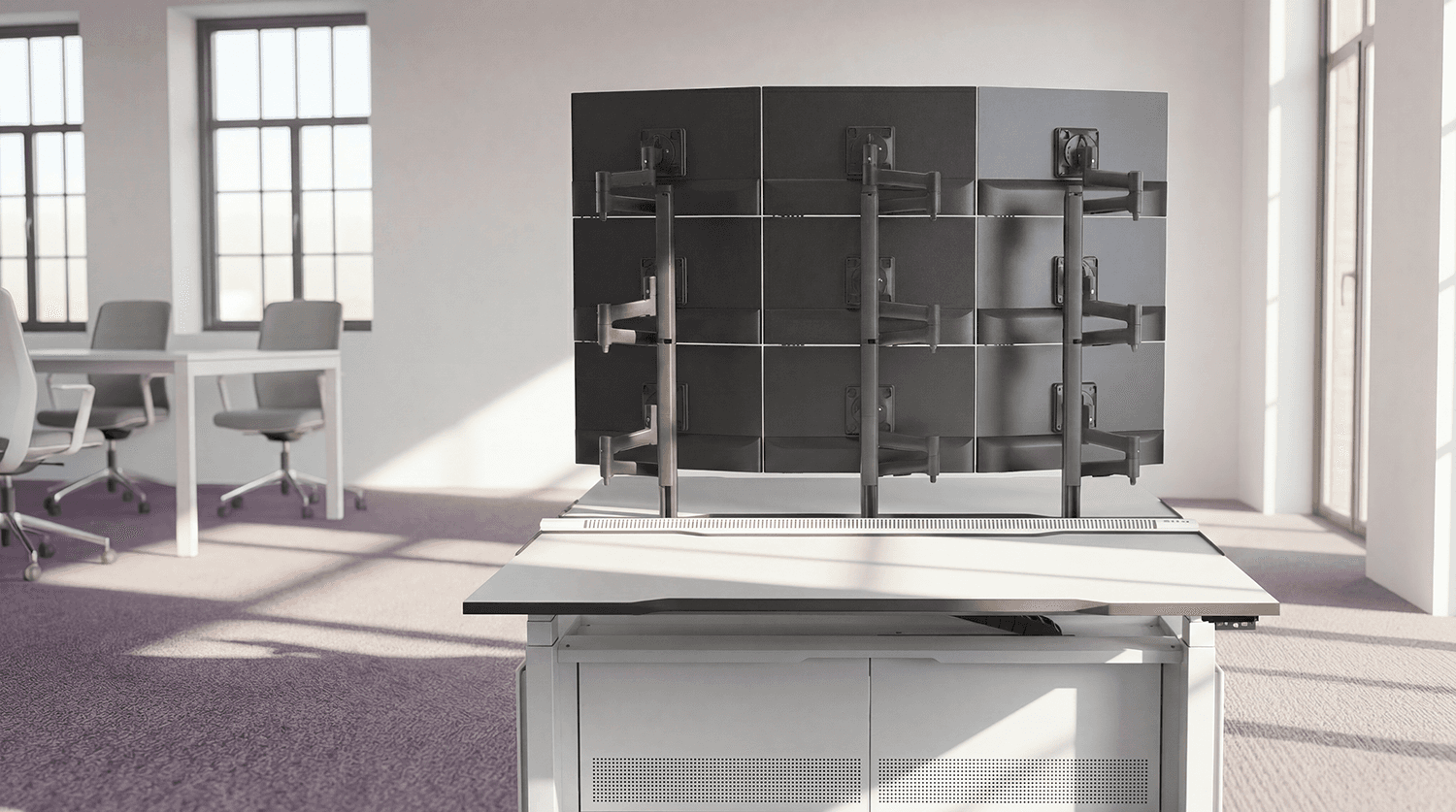
With six or more screens in view simultaneously, layout determines how fast a trader interprets and acts. The screen array is the interface to the market, its geometry is a performance variable.
What to specify
Group by priority. Centre for live price charts and trading platforms. Left for market news and feeds. Right for communication tools such as Bloomberg chat. Peripheral for secondary data and analytics.
Mount to structure, not to the surface. OPTIMA monitor arms mount to the DAS Management Rail, a structural spine running the length of the desk. Screens are carried by the desk frame rather than clamped to the worksurface, which keeps the array stable and allows repositioning without re-engineering the setup.
Consistent sizing. Identical monitors prevent the visual breaks and micro-adjustments that come from mismatched panels.
Eye level. Top screens sit slightly below eye level to reduce neck strain.
Capacity, honestly stated. OPTIMA T4 can support up to 12 screens and 6 CPUs per position. Specify against real screen counts, not aspirational ones.
Professional insight: A trading array should work like a cockpit, every critical data stream inside natural sightlines, nothing requiring a deliberate head turn.
3. Cable and technology management: hidden efficiency
Why it matters
Loose cabling isn't an aesthetic problem. It's disconnections, restricted airflow and slow troubleshooting, each one costing seconds a trading floor doesn't have.
What to specify
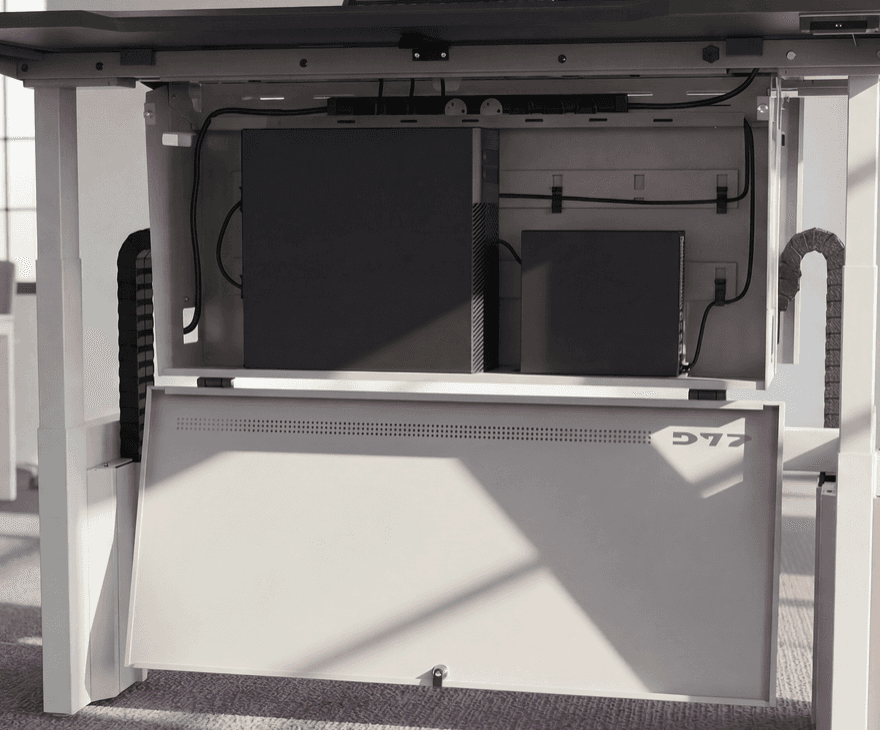
Integrated cable management. The DAS Management Rail routes cabling along the desk structure and supports desktop power modules, UK sockets, USB-A, USB-C and peripheral ports, presented at the worksurface rather than trailed to it.
Dynamic Cable Management Tray, Track and Risers. On positions running the Ergonomic Height Adjustment System, the Dynamic Cable Management Track carries the loom through the full travel of the desk. Cables move with the worksurface instead of being dragged, snagged or pulled loose each time a trader stands.
Serviceable enclosures. Technology access is designed around the IT team, not just the trader. T4 uses ergonomic doors onto a capacious CPU enclosure with trolleys included, so a machine can be drawn out and swapped without dismantling the position. T3 uses side-opening doors and raised enclosures housing four mid-sized CPUs horizontally. T7 uses a drop-down hinged door giving direct access to technology and cables, with power reachable from the front or from the top of the enclosure via the Service Slide.
Heat management. A central vent is engineered into the desk structure to draw heat upward and away from the CPUs beneath. No fans. No power draw. No maintenance overhead. Just directed airflow holding equipment within operating tolerances under sustained load.
Labelling. Colour-coded or numbered tags cut identification time when something fails mid-session.
Professional insight: Downtime is a design outcome. Specify enclosures your IT team can open, work in and close in minutes, because they will, repeatedly, for the life of the floor.
4. Height adjustment and movement: fighting fatigue
Why it matters
Sedentary work reduces blood flow and alertness. Across a 12-hour session, that shows up as slower thinking and physical discomfort.

What to specify
Height adjustment that moves the technology too. As CPUs get lighter and smaller, traders increasingly want hardware travelling with the desk. OPTIMA T7 does exactly that, the interchangeable technology enclosure travels with the worksurface through the full range of the Ergonomic Height Adjustment System, in both seated and standing positions, so a position change doesn't mean re-tensioning cables or leaving a machine stranded at floor level. T7 Delta carries 2 CPUs per user position in a front-hinged enclosure on the same principle.
Repeatable positions. The digital controller on the Ergonomic Height Adjustment System means a trader hits their standing height precisely each time, rather than settling for whatever the button lands on.
Active seating. Stools and chairs encouraging micro-movement reduce stiffness across long sessions.
Movement-friendly layouts. Floorplates should allow short breaks and collaboration without cutting across workflow.
Professional insight: Height adjustment only gets used if using it is frictionless. If standing means wrestling a cable loom, the desk stays down all day and the investment does nothing.
Specifying the right platform
OPTIMA is one core platform across six configurations, so a floor can be specified position by position against real technology loads:
System | Built for |
T7High-Capacity Moving Enclosure | Multiple large towers, even a UPS, can be easily housed within the high-capacity enclosure. This is all achieved while maintaining clear, easy access to power and data modules, cable routing up to the worksurface, and down to the termination boards. |
T6Compact Moving Enclosure | The compact choice for single or multiple SFF towers, thin client and dock type hardware but without compromising the facility for substantial power and data modules and cabliling. |
T4Maximum Perfomance | High capacity pull-out CPU trollies. Built for the most demanding IT loads. The largest enclosure for multiple high-performance towers. |
T3Balanced Capacity | Full-width bridged enclosure with side opening, heat and sound baffled doors. Suits SFF and midi-tower machines. |
T2Compact Protection | Wide yet low suspended enclosure with drop-down door. Thin clients and server-based setups. |
T1Essential Simplicity | Open, riser-mounted shelf. For single CPU and Thin client set ups. |
Conclusion: the desk is infrastructure
In trading, milliseconds matter. Performance depends on expertise and instinct, and on whether the environment supports them or works against them.
Refine the ergonomics. Design the screen geometry deliberately. Route the cabling into the structure. Strip the visual noise. Make movement frictionless. Each one is a specification decision, and each one shows up in output.
A trading desk is not standard office equipment. It is precision infrastructure, as essential as the technology and talent it carries.
Performance is earned.